Ship faster with tracking for modern ecommerce teams
Detect CMS, generate & audit GA4, Meta, TikTok and Pinterest events, monitor your dataLayer in real time — from one Chrome side panel.
Trusted platforms
Features
Tracking tools for the modern ecommerce stack
From CMS detection to pixel validation — Traacky covers the full tracking audit workflow in one side panel.
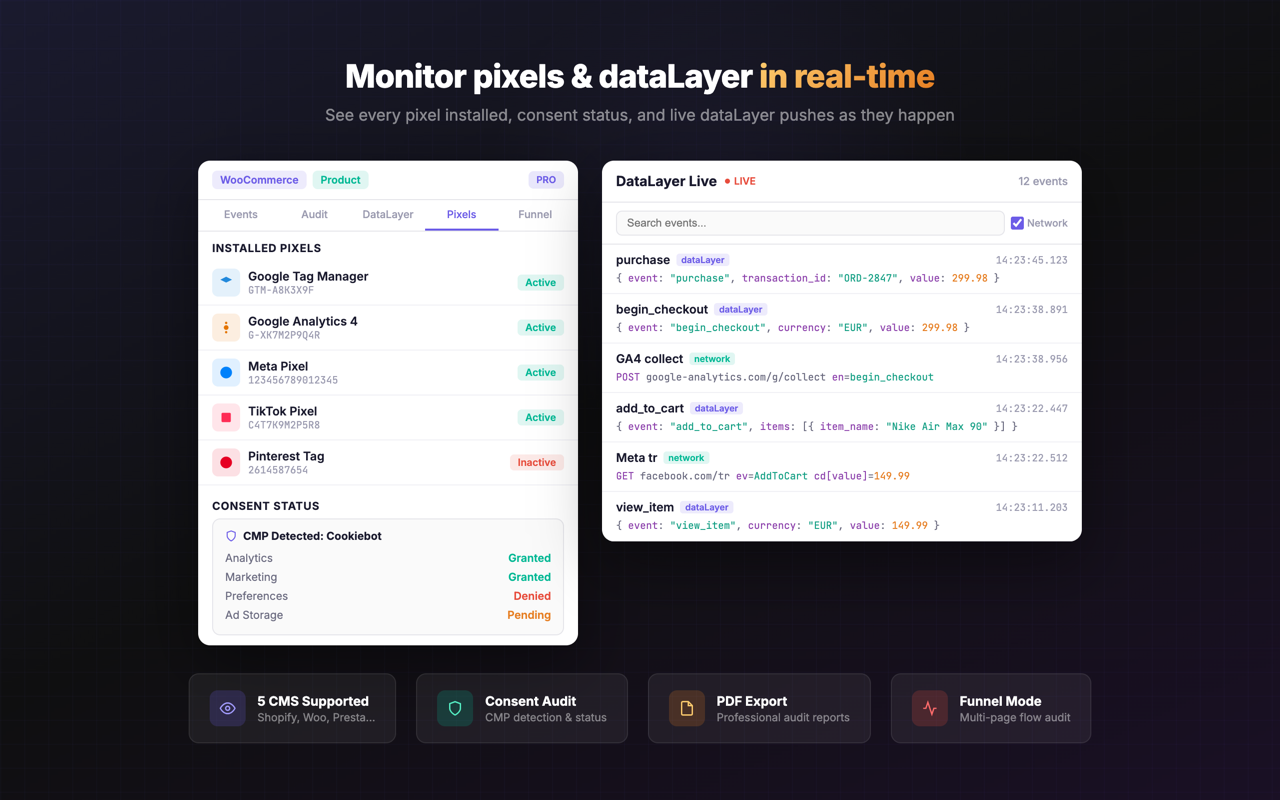
Real-time DataLayer inspector. See every push as it happens — structured, syntax-highlighted, live.
Monitor every dataLayer.push in real time as events flow through GTM. Structured output with full payload inspection, filtering, and auto-scroll. No more console.log debugging.
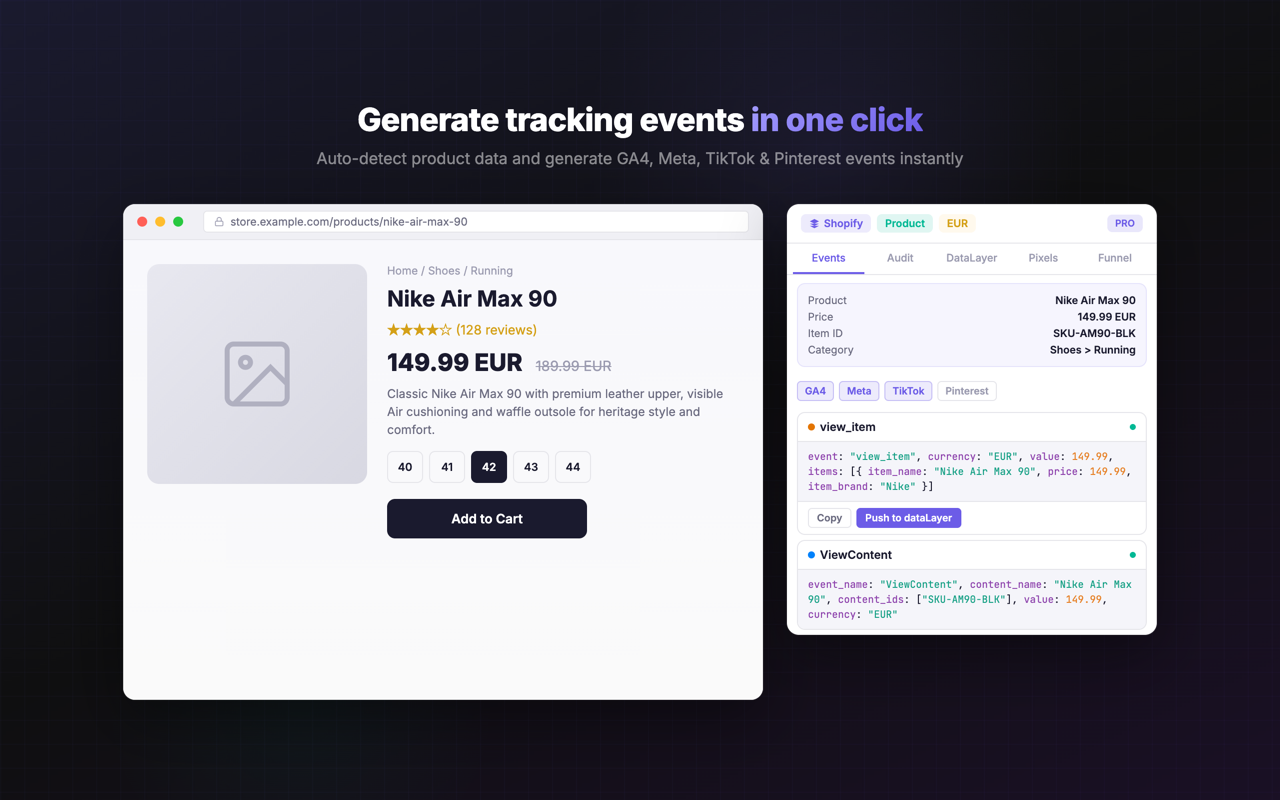
One-click event generation. From page data to tracking events — automatically.
Traacky detects your CMS, extracts product, collection, cart and order data, then generates properly structured GA4, Meta, TikTok and Pinterest events. Zero manual mapping.
Smart pixel detection. Every active pixel on the page — found in seconds.
Finds GA4, Meta Pixel, TikTok Pixel, Pinterest Tag, Snap Pixel, LinkedIn Insight Tag and GTM containers on any page. See pixel IDs, load status, and detected events at a glance.
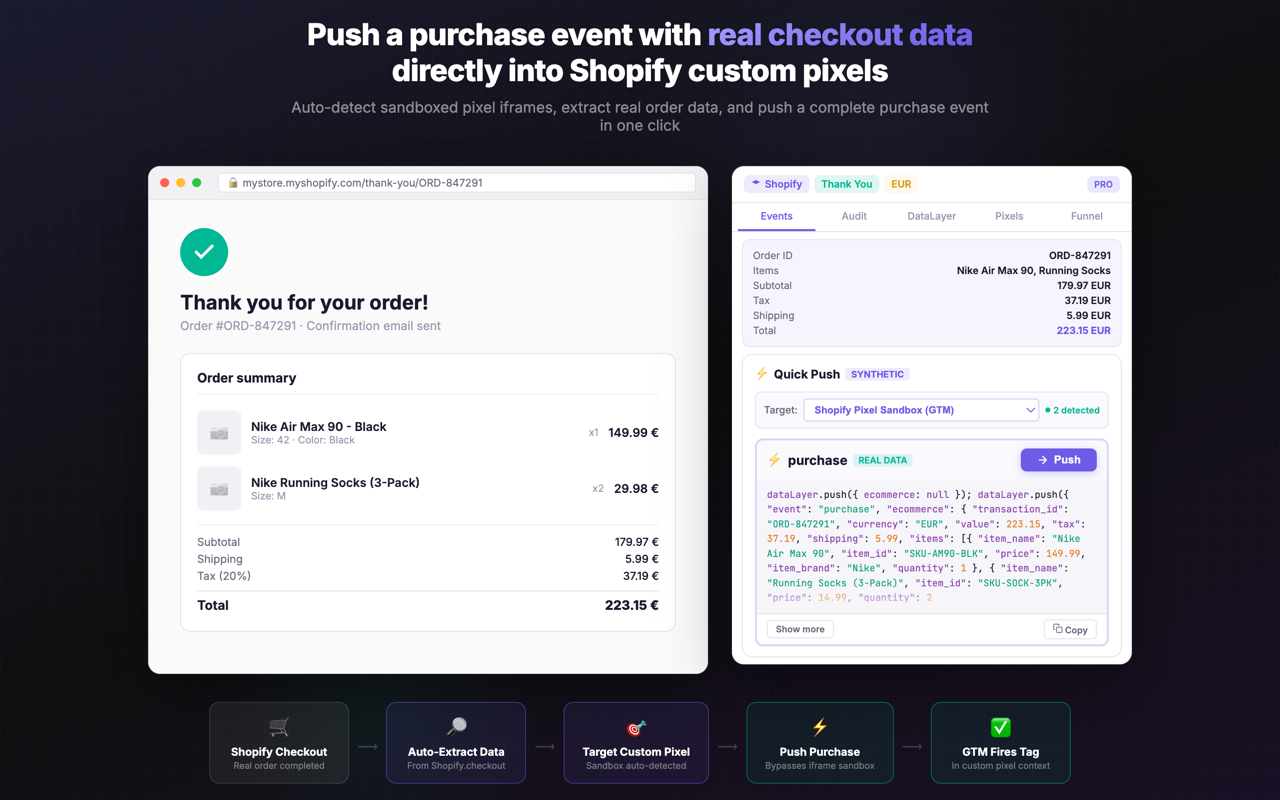
Push to custom pixels. Bridge the gap between events and Shopify sandboxes.
Auto-detects Shopify custom pixel sandbox iframes and pushes real purchase events directly into them — no code, no configuration. The only tool that bridges generated events and Shopify's sandboxed pixel environment.
Zero configuration. Install. Open any ecommerce site. It just works.
Auto-detects Shopify, WooCommerce, PrestaShop, Magento and Webflow. Extracts page type, product data, cart contents and order details automatically. No setup, no tokens, no permissions.
Speed and accuracy for agencies. And devs.
5 CMS platforms
Shopify, WooCommerce, PrestaShop, Magento, Webflow
6+ pixel platforms
GA4, Meta, TikTok, Pinterest, Snap, LinkedIn
Real-time monitoring
Every dataLayer push, every network request — live
Event audit
Compare generated vs fired events — spot gaps instantly
Funnel mode
Home → Collection → Product → Cart → Checkout, automated
100% local
No data ever leaves your browser. Zero external servers.
See Traacky in action
A full tracking audit toolkit — right in your browser side panel.
Simple, transparent pricing
Start free and upgrade when you need more. All paid plans include a 30-day money-back guarantee.
Free
Get started with essential tracking tools
- CMS & page type detection
- Basic event generation (GA4)
- DataLayer live view
- Pixel detection
- 5 audits per day
Starter
For freelancers and solo marketers
- Everything in Free
- GA4 + Meta event generation
- Unlimited audits
- Event export (JSON / CSV)
- Priority support
Pro
For agencies and power users
- Everything in Starter
- All platforms (TikTok, Pinterest…)
- Push to custom pixel
- Funnel mode
- Bulk export & reports
Agency
For teams managing multiple clients
- Everything in Pro
- Up to 5 team seats
- Client workspace profiles
- White-label exports
- Dedicated support channel
All paid plans include a 30-day money-back guarantee. Cancel anytime.
Frequently asked questions
Yes! The free plan gives you CMS detection, basic GA4 event generation, dataLayer live view, pixel detection, and 5 audits per day. Upgrade anytime for access to all platforms, funnel mode, and push to custom pixel.
Traacky auto-detects Shopify, WooCommerce, PrestaShop, Magento, and Webflow. It extracts product, collection, cart, and order data automatically from each platform.
Traacky generates and audits events for Google Analytics 4 (GA4), Meta Pixel (Facebook), TikTok Pixel, Pinterest Tag, and more coming soon. It also detects GTM, Snap Pixel, and LinkedIn Insight Tag.
Traacky detects Shopify custom pixel sandbox iframes on checkout and thank-you pages. It then pushes properly formatted purchase events directly into those sandboxes — no code required. This bridges the gap between your generated events and Shopify's sandboxed pixel environment.
Traacky runs entirely in your browser. No ecommerce data, page content, or tracking events are sent to any external server. Everything stays local in your Chrome session.
Traacky works best with standard CMS themes (Shopify Liquid, WooCommerce templates, etc.). Headless storefronts with custom frontends may not be fully detected, but pixel detection and dataLayer monitoring work on any site.
Absolutely. The Pro and Agency plans include export features (JSON, CSV) and funnel mode, making it easy to generate comprehensive tracking audit reports for clients.
Click 'Add to Chrome' to install from the Chrome Web Store. Once installed, click the Traacky icon in your toolbar to open the side panel on any ecommerce site.
The most advanced tracking inspector for Chrome.
Join thousands of tracking professionals who save hours every week with Traacky.
Add to Chrome — Free